Study Adventure Planner
Designing a Study Adventure Planner isn’t just about creating a visual document—it’s about crafting a powerful tool that aligns with your academic goals, personal learning style, and long-term vision. As a graphic designer, understanding how to build an Editable Study Adventure Planner Interior means recognizing the importance of usability, flexibility, and visual clarity. This planner isn’t only for students; it's a design challenge that blends practicality with creative expression, making it a compelling project for anyone interested in editorial design, branding, or digital product development.
Why the Study Adventure Planner Matters in Graphic Design
The Study Adventure Planner is more than just a collection of pages—it's a structured framework designed to help users organize their academic journey visually. From goal setting to time management, each section of this planner requires thoughtful design choices. A well-designed interior ensures that information is not only easy to digest but also aesthetically pleasing, reinforcing the value of visual hierarchy and typography in user experience (UX) design.
When you're working on such a project, you need to consider brand identity, color schemes, and layout consistency. These elements are crucial for maintaining a professional look while ensuring the planner remains functional. Whether you're designing for a student, educator, or educational brand, the right combination of creative assets can elevate the overall presentation and make the planner feel personalized and engaging.
Key Sections and Their Design Implications
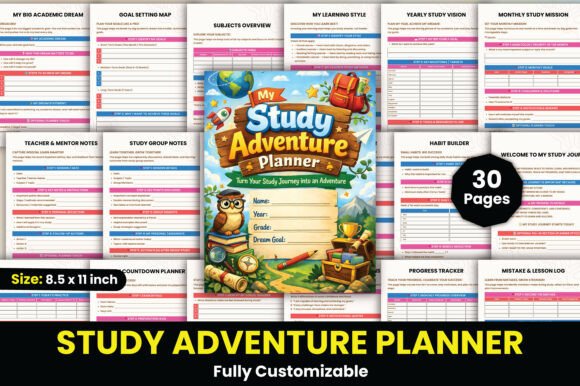
Each page of the Study Adventure Planner offers unique design opportunities. For example, the Yearly Study Vision and Monthly Study Mission sections require clear typography and visual cues to guide the reader through their academic timeline. The Time Management Tracker benefits from a clean, organized layout with scalable elements that allow for easy customization using tools like Canva.
Consider the Distraction Control Page—this could be a great opportunity to experiment with color palettes that promote focus and calmness. Similarly, the Motivation Affirmations section allows for creative use of fonts and imagery to inspire the user. Each of these sections contributes to the overall branding and user engagement of the planner.
- Goal Setting Map: Use icons and color-coded zones to represent different academic objectives.
- Subjects Overview: Implement a modular layout that makes it easy to update or rearrange content.
- Revision Planner: Focus on readability with high-contrast text and visual timelines.
- Exam Countdown Planner: Incorporate dynamic visuals that change as the deadline approaches.
Creating an Editable Experience with Canva
The beauty of the Editable Study Adventure Planner Interior lies in its adaptability. With a free Canva account, users can easily customize each page to suit their needs. This feature is especially valuable for designers who want to offer digital products that are both versatile and user-friendly. Canva's drag-and-drop interface simplifies the process of editing layouts, swapping out images, or adjusting colors without requiring advanced technical skills.
Moreover, the ability to export the planner in multiple formats—such as PDF, JPG, and PNG—ensures that it can be used across various platforms, from print to digital media. This versatility is essential for designers aiming to create social media graphics, presentations, or even merchandise based on the planner’s theme.
Whether you're enhancing a personal study routine or developing a product for educational brands, the Study Adventure Planner represents a blend of functionality and creativity. By focusing on design workflow, modern aesthetics, and professional presentation, you can ensure that your planner stands out in today’s competitive design landscape.